Aspire for local development
What
Aspire is an orchestration stack allowing you to describe services, dependencies and their relationships using C# or (recently) TypeScript. You can use it to define databases, queues, apis and frontends needed to run a distributed application. Once your AppHost project containing the definition of services and resources is ready, you can start the whole stack with a single command (or by hitting F5). What you get with it is more than a process manager. A browser-based dashboard on `localhost` collects structured logs, distributed traces, metrics, environment variables and resource state for every service in one place — powered by OpenTelemetry and wired up with near zero configuration. Integration packages for databases, message brokers and caches do more than spin up containers; they also configure resilience policies where it applies, register health checks and feed everything back into the dashboard.
Why
Managing a local development environment for big distributed applications is always a challenge. Organizations and teams often struggle to have a simple and repeatable setup that would allow new developers to jump in quickly and start bringing value. A wall of "contact X to get access to Y", "install N in version vv.vv exactly or it won't work", "yeah, but this needs to start before that, or it won't work — yeah, it wasn't in the doc but everyone knows that" stands between a newcomer and their first contribution. Aspire breaks that invisible wall. The description of the system and the instructions for running it live in one place - the codebase. Starting multiple services becomes a breeze, with no manual steps or tweaks (after you're done with simple initial setup).
How
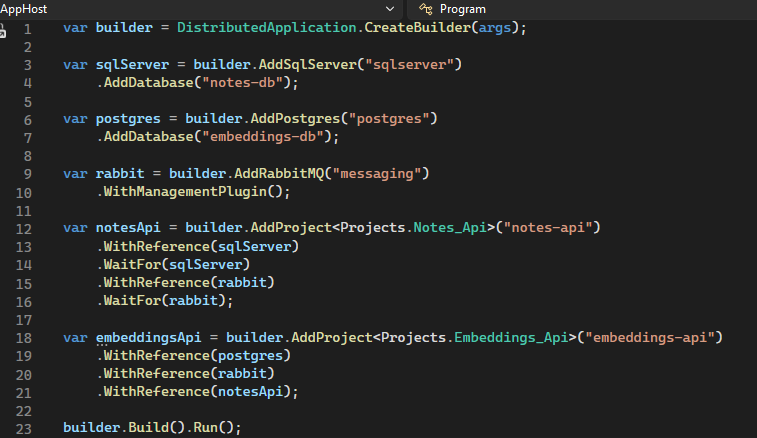
Installing Aspire locally and running your first project is simple enough and well documented under the official getting started guide: https://aspire.dev/get-started/first-app/?aspire-lang=csharp. The whole magic of Aspire happens in AppHost.cs (or AppHost.ts since this March, depending on your chosen language). This is where you define what projects to use, what dependencies they have and how they are called. See the example below:
builder = DistributedApplication.CreateBuilder(args);
var sqlServer = builder.AddSqlServer("sqlserver")
    .AddDatabase("notes-db");
var postgres = builder.AddPostgres("postgres")
    .AddDatabase("embeddings-db");
var rabbit = builder.AddRabbitMQ("messaging")
    .WithManagementPlugin();
var notesApi = builder.AddProject("notes-api")
    .WithReference(sqlServer)
    .WaitFor(sqlServer)
    .WithReference(rabbit)
    .WaitFor(rabbit);
var embeddingsApi = builder.AddProject("embeddings-api")
    .WithReference(postgres)
    .WithReference(rabbit)
    .WithReference(notesApi);
builder.Build().Run();
The most notable part is the builder that represents the host used to run the application. The builder exposes methods such as AddProject that allow you to define .NET projects to run. You can then define the references of this project, such as a database and message queue (or other projects), and declare whether the project has to wait for each resource before it starts. The setup is clean and readable but most importantly - it is validated at compile-time and does not need indentation (looking at you, Docker Compose).
The integrations used in the example are a small slice of what is available. The first-party catalog covers most of the common needs — SQL Server, Postgres, Redis, RabbitMQ, MongoDB, Kafka, OpenAI, and the major Azure resources — and an active community fills in the rest, from Ollama to AWS services and plenty in between. They come in pairs: `Aspire.Hosting.X` registers the resource in the AppHost, while the client-side package the consuming service references (e.g. `Aspire.Npgsql`, `Aspire.StackExchange.Redis`, `Aspire.RabbitMQ.Client`) reads the connection string, attaches telemetry and picks up the registered health check.
The AppHost is not only for local dev. `aspire publish` takes the same model and turns it into deployment artefacts for Azure Container Apps or Kubernetes — the description of the system on your laptop is the same one that gets published to production.